
01 Built-in
Trend + trailing stop
MOUNT ATR Buy/Sell Signals
Tracks volatility with ATR trailing stops and marks a BUY or SELL when the active trend flips.
ATR lengthMultiplier
Turn a trading idea into clear rules, test it on historical candles, practise with paper money and optionally let our server follow your rules when the worker and market feed are available. No coding needed.
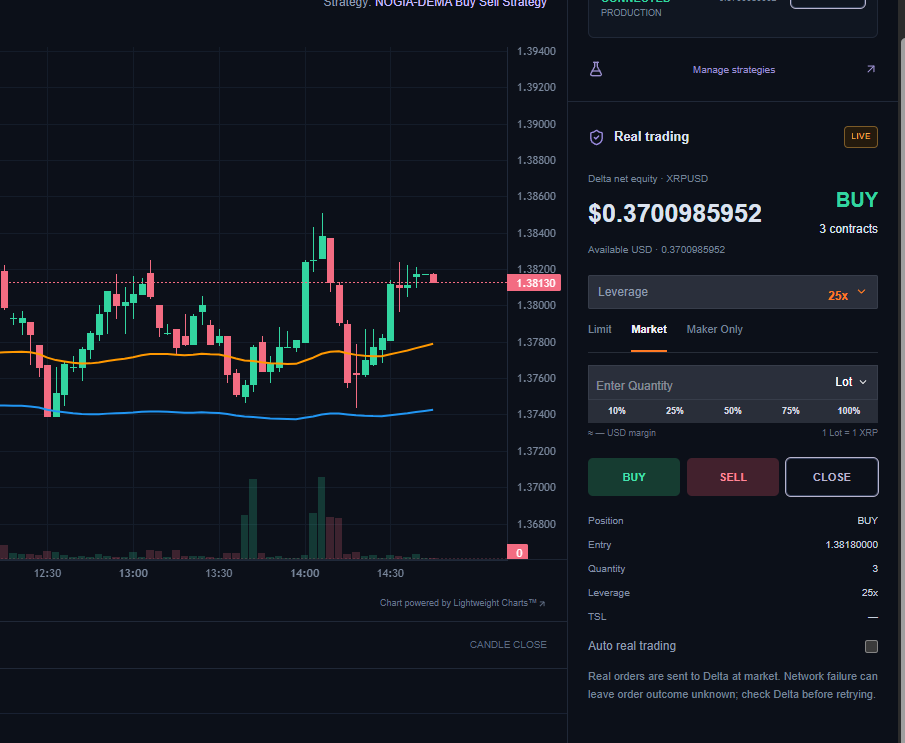
Open the library, choose a strategy and start exploring its plots and confirmed signals. Change the inputs from the chart whenever you want.
Tracks volatility with ATR trailing stops and marks a BUY or SELL when the active trend flips.
Combines fast and slow EMA crosses with RSI levels and a configurable no-trade time window.
Uses fast and slow Double EMA lines for smoother, more responsive crossover signals with an optional price filter.
Confirms EMA crossover direction with RSI momentum thresholds to filter weaker entry signals.
Write buy when crossover(fast, slow). No JavaScript, no brackets maze.
Signals and plots appear on a live chart as you type, with quick backtest stats.
Every problem is underlined with its line number and a simple fix hint.
One input line gives you a slider. Tune settings without touching code.
Paste a TradingView strategy and convert it to MountainScript in one click.
Backtest it, apply it to the chart or switch on background auto trading when the required services are available.
Choose the way that suits you. Every strategy you save can be backtested, charted, paper traded and automated.
Write rules in JavaScript with ready indicators.
Drag blocks together. No coding needed.
Start from a ready, editable strategy example.
Coming soon: describe your idea in plain words.
Each tool does one job clearly, so you always know what your strategy is doing and why.
Test a strategy on up to 120,000 past candles. See every trade, win rate, drawdown and net result before you risk anything.
Try backtestingYour strategy draws its lines and confirmed BUY / SELL marks on a live candlestick chart, with indicators and Heikin Ashi.
Open the chartPractise with a $10,000 simulated balance. Set leverage, stop loss, take profit and a draggable trailing stop.
Start practisingWhen enabled and services are available, our server follows confirmed strategy signals even when your browser is closed. Outages can pause orders.
Set up auto tradingSee which strategy is running, every BUY / SELL with its time, whether the order was placed, and why auto trading stopped.
View logsYour account value, open position, profit and loss, win rate and a P&L curve, all on one page.
See portfolioTest first, practise second and automate only when you are confident in your rules.
Pick a template, drag blocks or write code.
Check how the rules behaved on real historical candles.
Trade the signals with simulated money and risk controls.
Let the server follow your rules when the worker and market feed are available, then review every log.
Choose a strategy, market and timeframe, then switch auto trading on. While the worker, market feed, database and exchange are available, the server checks new candles and follows your rules. Add a trailing stop, stop loss or take profit from Trade protection whenever you like.
Example view. Your own logs show your strategy's real activity.
Run the applied strategy across all Nifty 50 stocks and review a ranked shortlist of bullish setups from the latest 15-minute candles.
Indicator/strategy-based research only. Mountain Strategy is not a SEBI-registered investment adviser or research analyst, and these results are not issued, approved or endorsed by SEBI or NSE. This is not investment advice or a buy/sell recommendation.
Example view with sample scores, not a recommendation.
The Free plan is available now. Plus, Pro and Elite show proposed INR pricing and features for transparency, but they are not currently offered for purchase.
₹0/ month
Explore the platform and practise without connecting a broker.
₹299/ month
For regular strategy research, deeper backtests and paper automation.
₹799/ month
For traders ready to connect their own Delta India account and trade live.
₹1,499/ month
For advanced strategy creation and server-side live automation.
| Feature | Free₹0 | Plus₹299 · preview | Pro₹799 · preview | Elite₹1,499 · preview |
|---|---|---|---|---|
| Strategy Lab (Templates + Visual Builder + Code Mode) | ||||
| Mountain Studio (MountainScript) | 3 scripts | Unlimited + Pine import | ||
| Saved Strategies in Library | 3 | 10 | 25 | 50 |
| Community strategy showcases | Non-commercial | Non-commercial | Non-commercial | Non-commercial |
| Backtest Depth (candles) | 5,000 | 20,000 | 60,000 | 120,000 |
| Timeframes | 5m, 15m, 1h, 4h, 1d | All 8 | All 8 | All 8 |
| Chart Indicators | 3 | 5 | 10 | Unlimited |
| Paper Trading + SL / TP / TSL | ||||
| Background Paper Auto Trading | 1 strategy | 1 strategy | 2 strategies | 3 strategies |
| Live Trading (Delta) | ||||
| Background Live Auto Trading | 1 strategy | 2 strategies | ||
| Auto Trading Logs | 7 days | 30 days | 90 days | 1 year |
| Portfolio Page | Paper only | Paper only | Paper + Live | Paper + Live |
| Nifty 50 Scanner | Top 3 | Top 10 | Top 10 + Auto refresh | Top 10 + Auto refresh |
No paid checkout, recurring debit or subscription payment is currently accepted on this website. Read the payment and launch status. Live trading uses your own Delta Exchange India account and can lose real money.
Mountain Strategy is a web workspace where you build a rule-based trading strategy, backtest it on historical candles, practise it with paper trading and, if you choose, let it run automatically.
No. You can start from a template or build rules with the drag-and-drop Visual Builder. Code Mode is there if you prefer to write JavaScript, and an AI Generator that turns plain words into a strategy is coming soon.
Mountain Studio is the MountainScript editor in the Strategy Lab. Pro includes up to 3 Mountain Studio scripts. Elite removes that limit and also adds TradingView Pine Script import.
Yes. Free access includes live charts, paper trading, starter templates, core backtesting and Community. Plus, Pro and Elite pricing is currently a product preview only; paid checkout and recurring billing are not active.
No. A Mountain Strategy subscription covers the software only. Brokerage, exchange fees, taxes and any other charges from your broker remain separate.
When enabled, the background worker can run after the browser closes. It still depends on the worker, hosting, market feed, database and exchange being available; outages can delay or pause signals and orders.
Crypto futures and options on Delta Exchange India such as BTC, ETH, XRP and XAUT, on timeframes from 1 minute to 1 day. Indian users can also scan Nifty 50 stocks with the strategy scanner.
Your key is verified by our server and saved encrypted (AES-256) to your account, so you connect only once. It is never shown to the browser, and disconnecting the broker deletes it.
No. Mountain Strategy is software for strategy research and practice. Signals, scores and backtests are informational and do not predict future returns. Trading decisions and their results remain your responsibility.
We recommend demo and paper trading first. Live trading is optional and uses your own broker account.
Mountain Strategy is not a SEBI-registered investment adviser or research analyst. Content, signals, scores and examples are software outputs for educational and informational use, not personalised advice or a buy/sell recommendation.
Backtests, indicators and past signals do not predict future performance. No strategy can guarantee profits or prevent losses.
Crypto assets, derivatives and leverage can cause rapid and substantial loss, including loss beyond expected stop levels during gaps, latency or volatile markets.
Use the simulated balance to understand signals, sizing and trailing stops. A successful demo or backtest does not mean the same result will occur in live markets.
Market data may be delayed, incomplete or unavailable. Network failures, exchange outages and third-party API changes can affect charts, signals and order status.
Use credentials and accounts you are authorised to access. Keep API permissions limited, protect credentials and comply with applicable exchange terms and local laws.
Mountain Strategy does not accept trading funds, hold crypto assets or operate a wallet or exchange. Optional orders are sent to the user's separately held third-party broker account.
By using the platform, you acknowledge that trading decisions and resulting gains or losses remain your responsibility. Consider advice from an appropriately qualified professional for your circumstances.
Backtest first, practise with paper money, then automate.